♨ KDS Command Center
Square-connected kitchen display

Kitchen Display System for Square — $39/Month

Keep your existing Square plan. Get up to two KDS screens, hosting, software updates and support for one simple monthly price.
✓ No credit card required ✓ Up to 2 KDS screens ✓ Windows desktop app
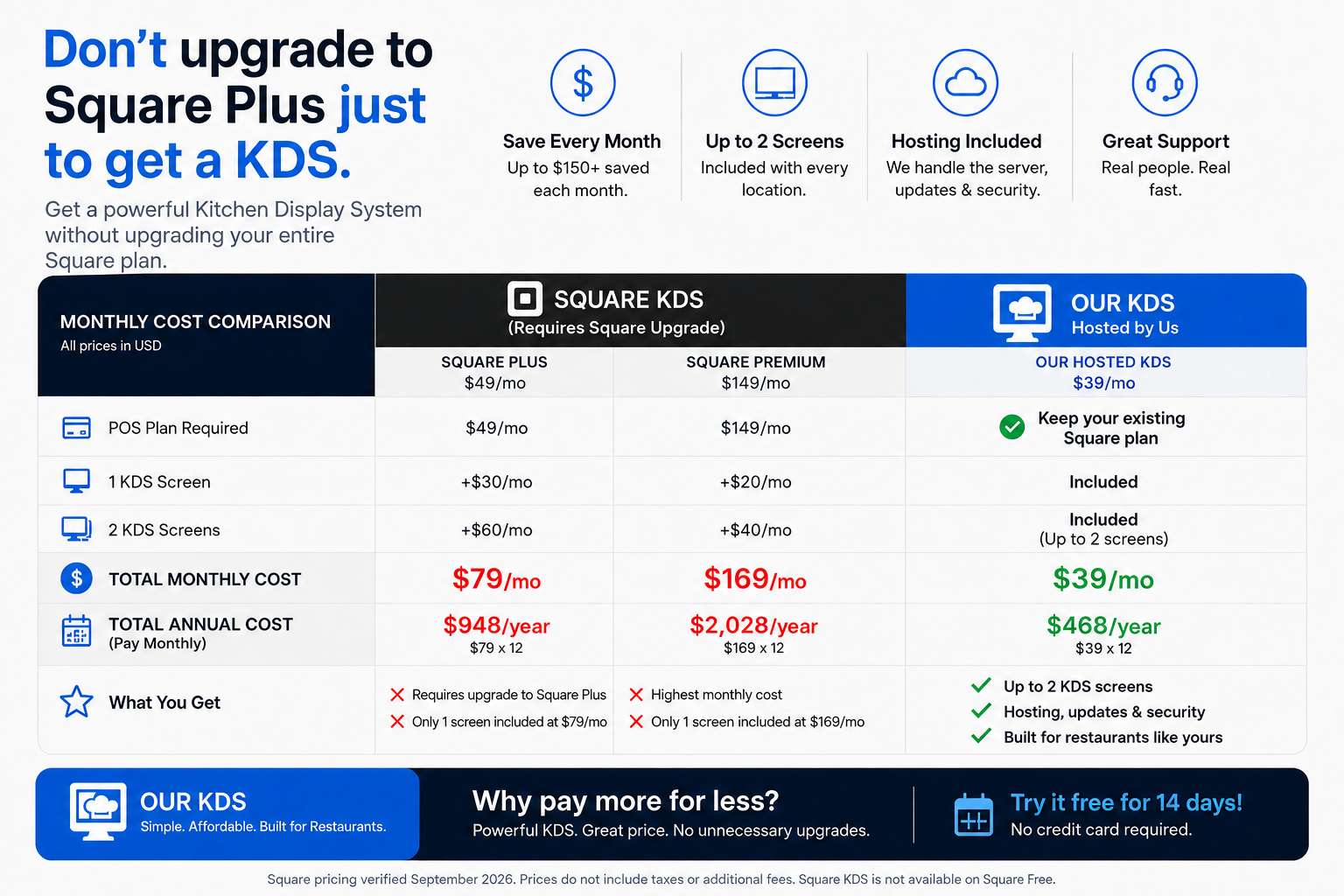
Cost comparison showing KDS Command Center at $39 per month with up to two screens included compared with Square Plus and Square Premium KDS pricing

Keep Square.
Skip the upgrade.

One simple price with hosting and up to two kitchen screens included.

Square Plus + 1 KDS $49 plan + $30 screen $79/mo
Square Premium + 1 KDS $149 plan + $20 screen $169/mo
KDS Command Center Keep your current Square plan · Up to 2 screens $39/mo
Square pricing verified September 2026. Taxes and additional fees excluded. Square KDS is unavailable on Square Free.
Built for fast-moving kitchens

Your kitchen,
under control.

A focused kitchen display that turns Square orders into an organized, easy-to-run kitchen workflow.

✓ No card required to start ✓ Cancel anytime ✓ Windows desktop app
♨ Command Center SYSTEM ONLINE
ACTIVE ORDERS 6 tickets in queue
◷ AVG 04:18
#1048

2 ITEMS

Classic Burger No onion · Add bacon

French Fries Large · Extra crispy

#1049

2 ITEMS

Chicken Sandwich Grilled · No tomato

Caesar Salad Dressing on side

#1050

1 ITEM

Margherita Pizza Large · Add mushrooms

⚡ Orders appear automatically
✓ Secure Square connection
Simple hardware

Use the hardware that works for your kitchen.

KDS Command Center doesn't require expensive proprietary display hardware. Run the system on a Windows PC and choose the screen setup that fits your kitchen.

▰

Monitor or TV

Want a larger kitchen display? Connect a monitor or television directly to the Windows PC.

  • Windows 10 or Windows 11 PC running KDS Command Center
  • Monitor or TV with an available HDMI input
  • HDMI cable from the Windows PC to the display
  • 24"–32" 1080p display is a great starting point
  • Touchscreen monitor can also be used
  • Great for larger, highly visible kitchen stations
Need a bigger screen? Standard display hardware lets you choose the size that works best for your kitchen.
🌐
Reliable network A reliable local network and internet connection are required. Ethernet is recommended for the Windows PC when available.
◼
Square account An active Square account and Square location are required to connect KDS Command Center to your incoming orders.
NO PROPRIETARY KDS HARDWARE REQUIRED. Use a touchscreen tablet over your local network or connect a monitor directly to the Windows PC.
Square-connected Kitchen-ready Simple monthly pricing Designed by food-service operators
One command center

Less screen switching.
More orders moving.

KDS Command Center keeps incoming orders, modifiers, and ticket status visible and actionable when your kitchen is moving.

01
▣

Live kitchen display

Turn incoming Square orders into clear kitchen tickets your team can move through quickly.

02
▤

Built for modifiers

Keep sizes, substitutions, removals, add-ons, and special instructions visible when every second counts.

03
▦

Up to two kitchen screens

Run up to two KDS screens for the same connected business location under one $39 monthly subscription.

04
✓

Touch-friendly workflow

Use a touchscreen tablet or compatible display to move through active tickets and mark completed orders ready.

From order to ready

A calmer service flow in three steps.

  1. 1

    Connect Square Link your merchant account and location securely.

  2. 2

    Receive live tickets Orders and modifiers arrive in a kitchen-first layout.

  3. 3

    Keep the line moving Track active work and mark completed orders ready.

Straightforward pricing

Try the full system for 14 days.

No card is required to start. Connect Square in the Windows app and your 14-day trial begins automatically. Subscribe inside the app only if you choose to continue.

KDS Command Center
$39/month

One connected business location.

  • 14-day free trial
  • Up to 2 KDS screens
  • Live Square order display
  • Hosting and software updates included
  • Cancel anytime
Get started → No charge during the trial. Subscription is optional afterward.
Clear from day one

Subscription and business policies

Terms of service

Review licensing, account responsibilities, availability, and acceptable use. Read the terms →

Support

Get help with installation, Square connection, billing, or cancellation. Visit support →

Ready when your kitchen is

Put every order in its place.

Start your free trial →